Hybrid visibility done right: Visualize, monitor, and correlate your VPCs, Subnets, EC2, ECS, and RDS services with AWS Cloud Observability in DDI Central
Every enterprise today runs on two kinds of infrastructure.
One half lives on-premises: the company’s data centers, internal networks, DNS zones, DHCP scopes, IP address spaces, and the systems that help every device find and connect to the right service. The other half lives in the public cloud: where applications, databases, containers, and storage run on infrastructure delivered by providers like Amazon Web Services (AWS).
This hybrid model is no longer a temporary phase. It is how modern businesses operate. But it brings a quiet, expensive problem: Visibility gets split. One team manages the on-premises network through one set of tools, while another team manages AWS through different consoles, scripts, dashboards, and reports.
That split creates a dangerous gap. Cloud charges appear for resources no one remembers approving. A new application fails because a subnet is running out of usable addresses. An auditor asks where workloads are hosted, and the answer takes three teams, five tools, and two weeks to assemble. Every quarterly review ends with the same uneasy question: What are we actually running, where is it, and how is it connected?
DDI Central’s Cloud Observability module was built to close that gap.
The module gives network and infrastructure teams a dedicated lens into AWS-native network assets. Instead of treating AWS as a disconnected estate, DDI Central helps teams understand how cloud-native network assets fit together in one operational view, including:
Virtual Private Clouds (VPCs): Logically isolated virtual networks within AWS where resources are launched.
Subnets: Segments within a VPC that help organize and manage cloud resources.
EC2 instances: Scalable virtual servers used to run applications and workloads in the cloud.
Elastic IPs: Static public IP addresses associated with AWS resources.
Elastic Network Interfaces (ENIs): Virtual network interface cards that connect EC2 instances to a VPC.
ECS clusters: Container management environments used to run Docker-based workloads.
RDS databases: Managed relational database services for engines such as MySQL and PostgreSQL.
Together, these views help teams correlate AWS networking, compute, container, and database resources from a single console.
A new lens for AWS network visibility
When you manage AWS infrastructure at scale, visibility is not just about seeing assets; it is about understanding how they relate.
AWS offers a vast ecosystem of components: EC2 instances, VPCs, subnets, network interfaces, Elastic IPs, ECS clusters, RDS databases, regions, Availability Zones, and security groups. But forming a complete network-aware picture usually requires tab-hopping, CLI queries, exports, spreadsheets, and scripts.
DDI Central’s Cloud Observability module brings these resources into one contextual interface designed for network-minded teams. It supports correlated visibility into EC2 instances, Elastic IPs, network interfaces, ECS clusters, RDS instances and clusters, VPCs, and subnets, enriched with platform types, tags, DNS mappings, public and private IPs, allocation tracking, subnet bindings, engine types, zones, CIDR metrics, fragmentation analysis, and usage trends.
From subnet exhaustion to interface associations, from region-level concentration to workload density, DDI Central turns raw AWS resource data into practical network intelligence.
What network admins miss in AWS
Cloud visibility becomes difficult not because AWS lacks data, but because the data is spread across too many places.
A network admin may need to know which EC2 instance is tied to which ENI, which subnet it sits in, which VPC owns that subnet, whether an Elastic IP is attached, and whether the resource is exposed publicly. In AWS, each part of that chain may live in a different view. In DDI Central, that relationship is visible as connected infrastructure.
This matters most during troubleshooting, planning, and audits. When an application fails, teams do not have time to assemble the picture manually. They need to see the resource, its address, subnet, zone, and dependencies together. When a subnet is close to exhaustion, they need to know before the next deployment fails. When tags, regions, and service locations are inconsistent, they need a way to organize cloud assets without building one more script.
DDI Central addresses five common gaps: fragmented visibility, missing correlation, slow troubleshooting, hidden subnet exhaustion, and manual tag parsing. It unifies AWS resources, connects EC2, ENI, VPC, subnet, and Elastic IP data, surfaces state and IP usage, highlights capacity risks, and organizes discovered assets automatically.
The result is not just monitoring. It is operational oversight.
Inside the AWS Cloud Observability dashboard
The dashboard begins with the question every infrastructure team needs answered quickly: What do we have?
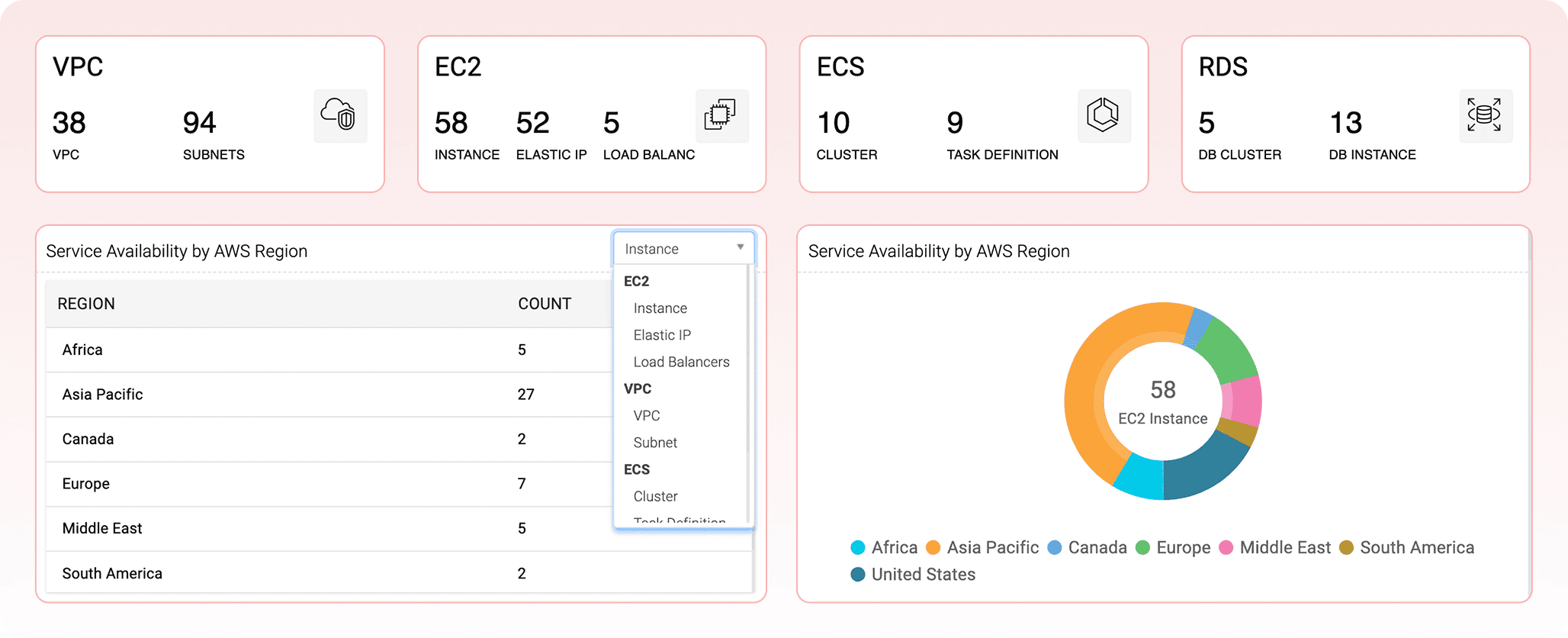
DDI Central provides a regional snapshot of AWS resources, including virtual networks, virtual servers, public addresses, load balancers, container clusters, and databases. Instead of exporting data or waiting for a report, teams can see a quick tally in one place.
The same view breaks resources down by region, making geographic concentration immediately visible. Teams can quickly understand how many EC2 instances, VPCs, databases, or container clusters are running in Asia Pacific, Europe, North America, or other regions. For planning, governance, and audits, this replaces spreadsheets with a single operational view.
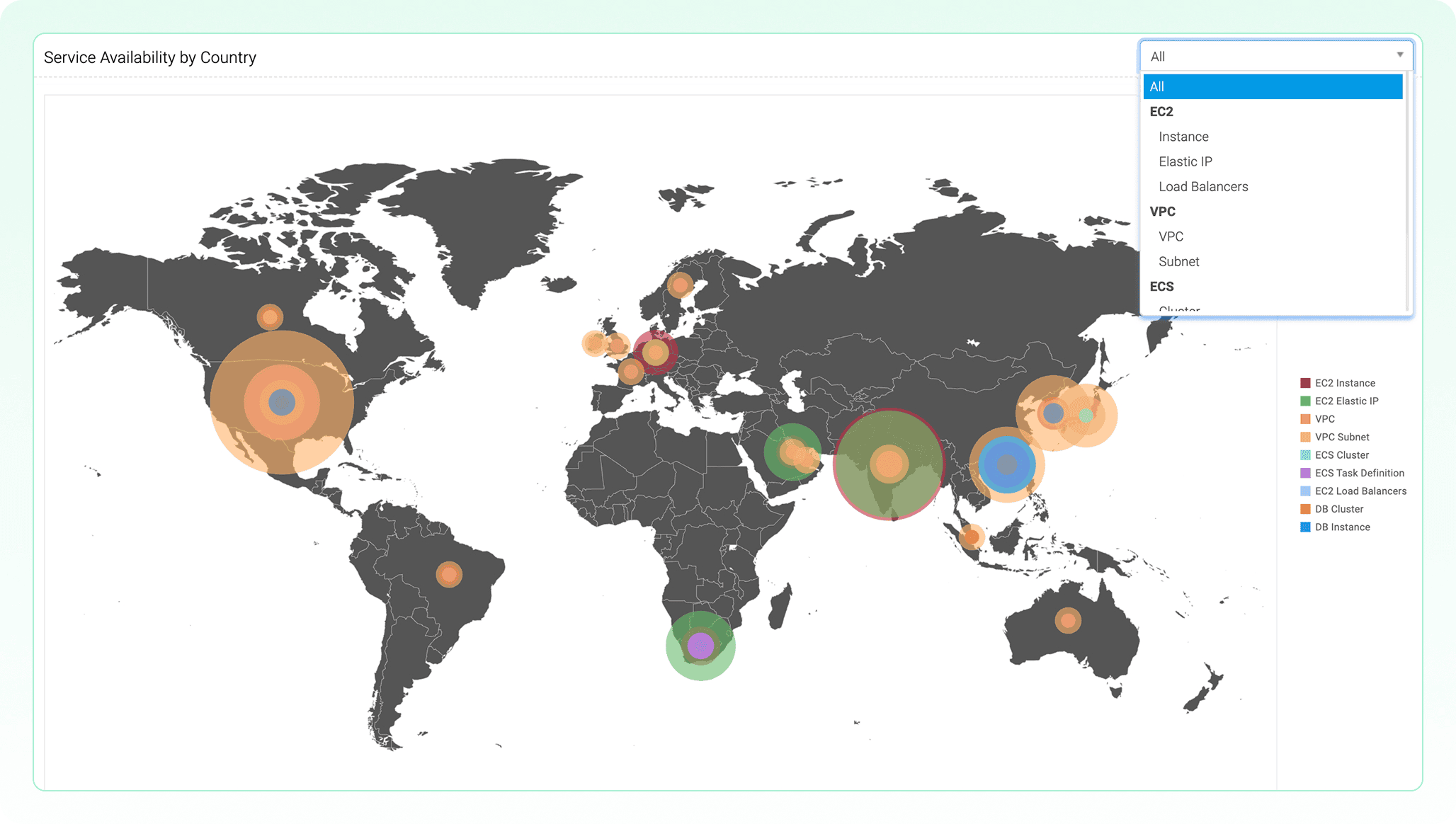
A global map adds another layer of clarity. Resources appear geographically, helping teams spot concentration, unexpected outposts, inactive regions, or resources deployed outside expected business locations. For regulated industries, this helps answer data residency questions. For resilience planning, it shows whether infrastructure is too concentrated in one region. For troubleshooting, it provides geographic clues that are often missed in list-based dashboards.
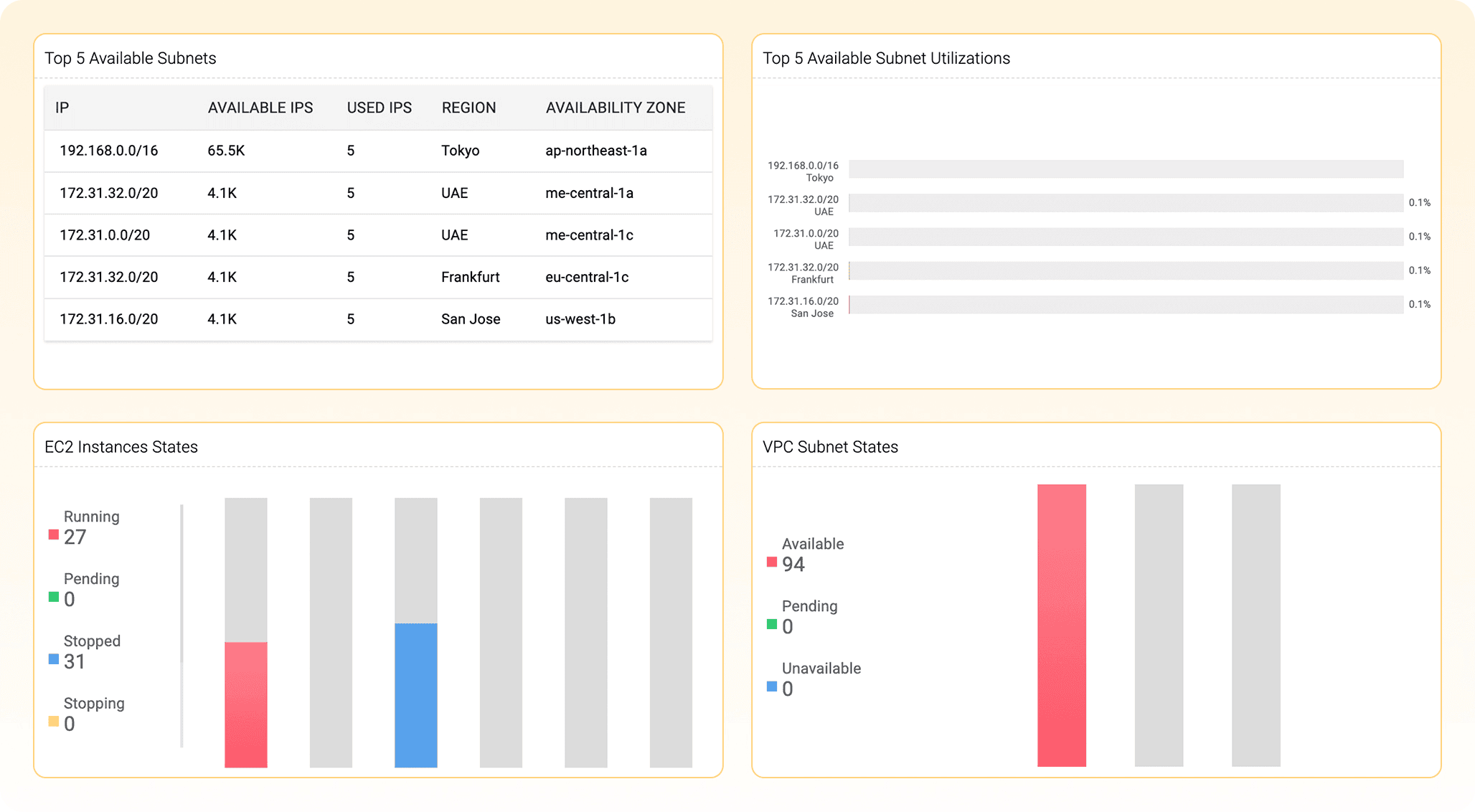
The dashboard also gives teams a live pulse on health, capacity, and waste. Utilization views highlight heavily used address ranges before address exhaustion disrupts deployments. State-based charts show how many instances are running, stopped, pending, or transitioning. Numerous stopped instances may indicate cost control, or waste that has gone unnoticed.
Together, these views answer three essential questions: What do we have? Where is it? Is it healthy and being used?
AWS VPCs and subnets: The cloud network fabric, finally mapped
A VPC is the private network that surrounds workloads running in AWS. Subnets divide that network into smaller address ranges across Availability Zones. Together, VPCs and subnets form the foundation for cloud connectivity, but in AWS they are often managed through separate views and configuration pages.
DDI Central pulls this network fabric into one place.
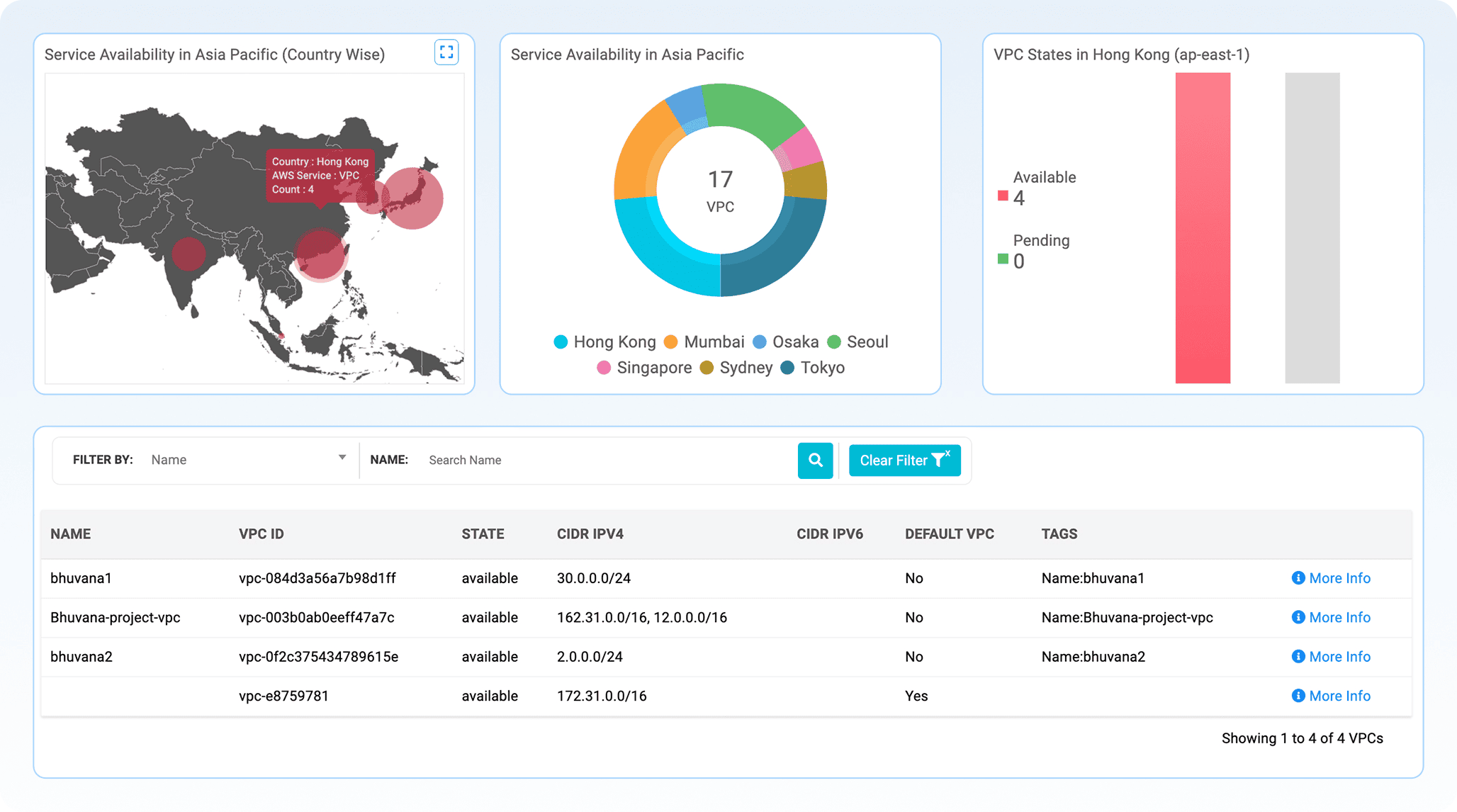
Teams can see VPC distribution across regions and Availability Zones, understand which networks are active, and identify provisioning states that need attention. CIDR blocks, IPv4 and IPv6 ranges, subnet associations, and usage metrics are presented with the context needed for real planning.
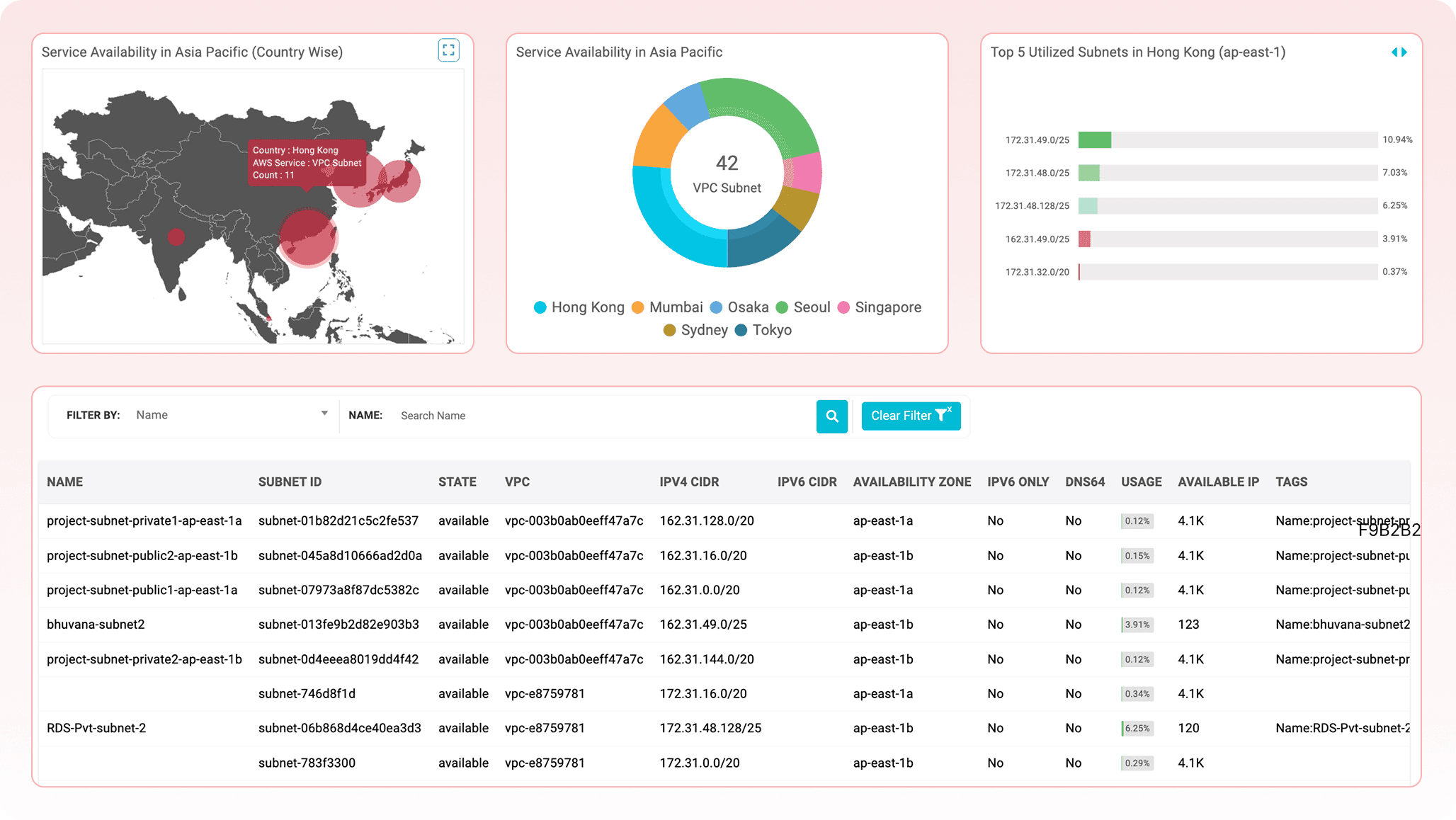
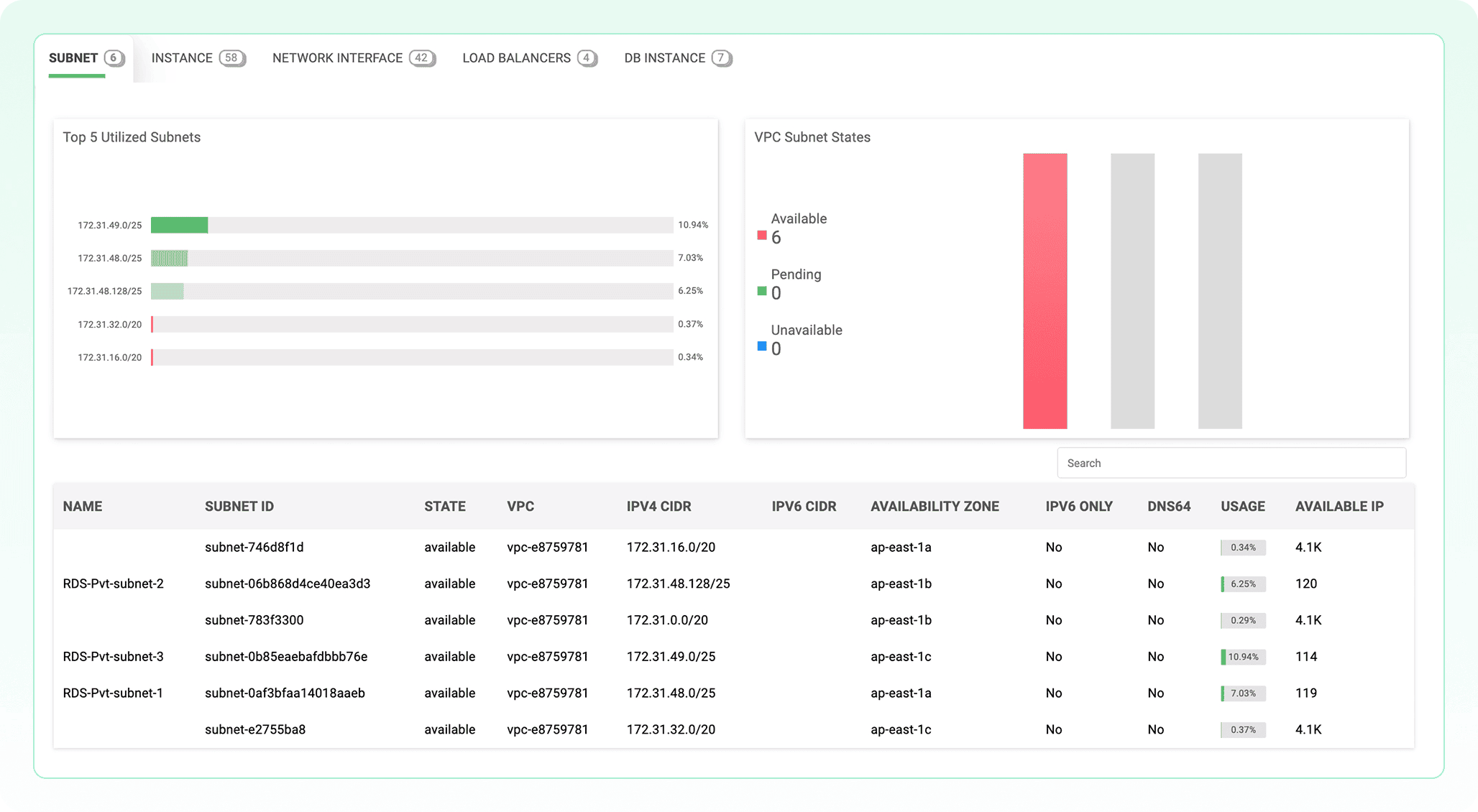
This is especially valuable for preventing subnet exhaustion. Many teams discover a subnet is full only when a deployment fails. DDI Central surfaces top-utilized subnets, available IP counts, and usage trends earlier, giving teams time to act.
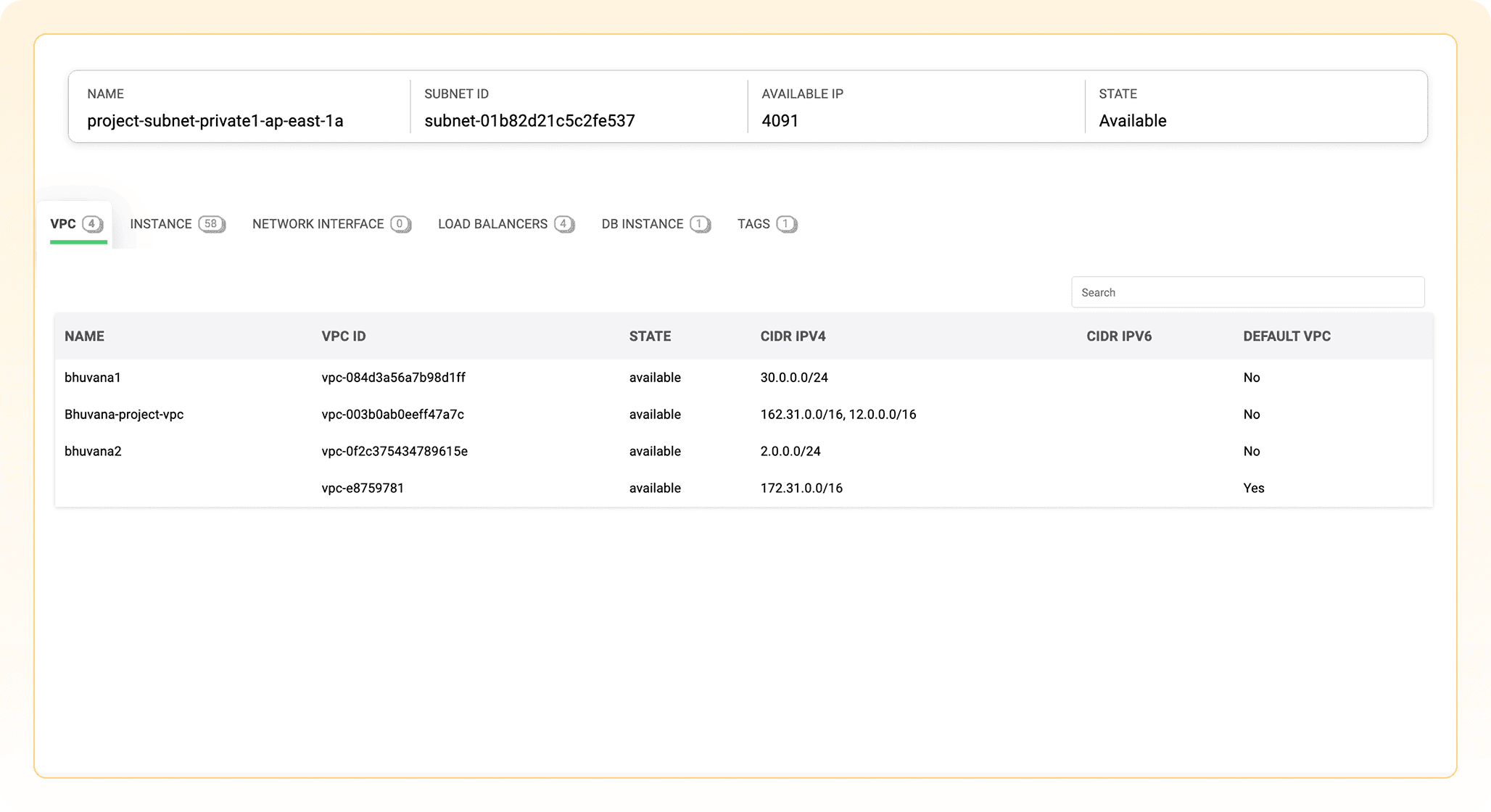
The real value appears when teams drill into a single VPC. They can see the subnets, instances, interfaces, load balancers, and databases inside it. Instead of asking, “What is running on this network?” and chasing the answer across AWS consoles, teams can trace the operational footprint from one view.
EC2: Virtual servers seen as connected infrastructure
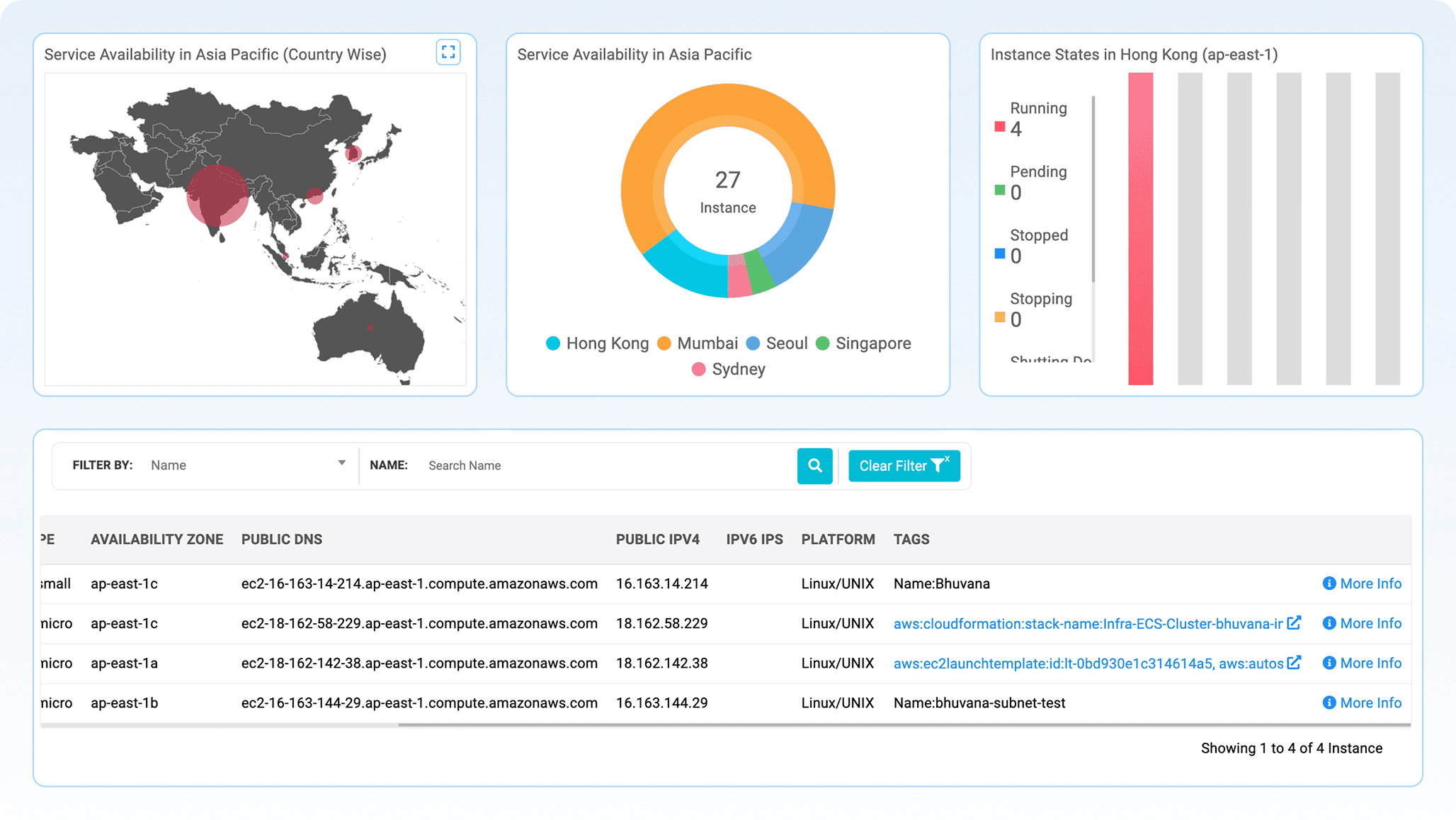
EC2 instances are the virtual servers behind many cloud workloads. AWS lists them. DDI Central helps explain them.
Monitor how many Elastic IPs are allocated vs. used, helping prevent wastage, cost overruns, or public IP exhaustion. Directly correlate each Elastic IP with its associated instance, private IP, network interface, and tags, offering full traceability of address assignments. Quickly spot and deallocate idle or orphaned EIPs that incur cost but aren't attached to any resource.
Zonal distribution also becomes easier to evaluate. If too many workloads are concentrated in one Availability Zone, resilience may be weaker than expected. If many instances are stopped, teams can determine whether that is intentional or whether resources are sitting idle and contributing to unnecessary cloud spend.
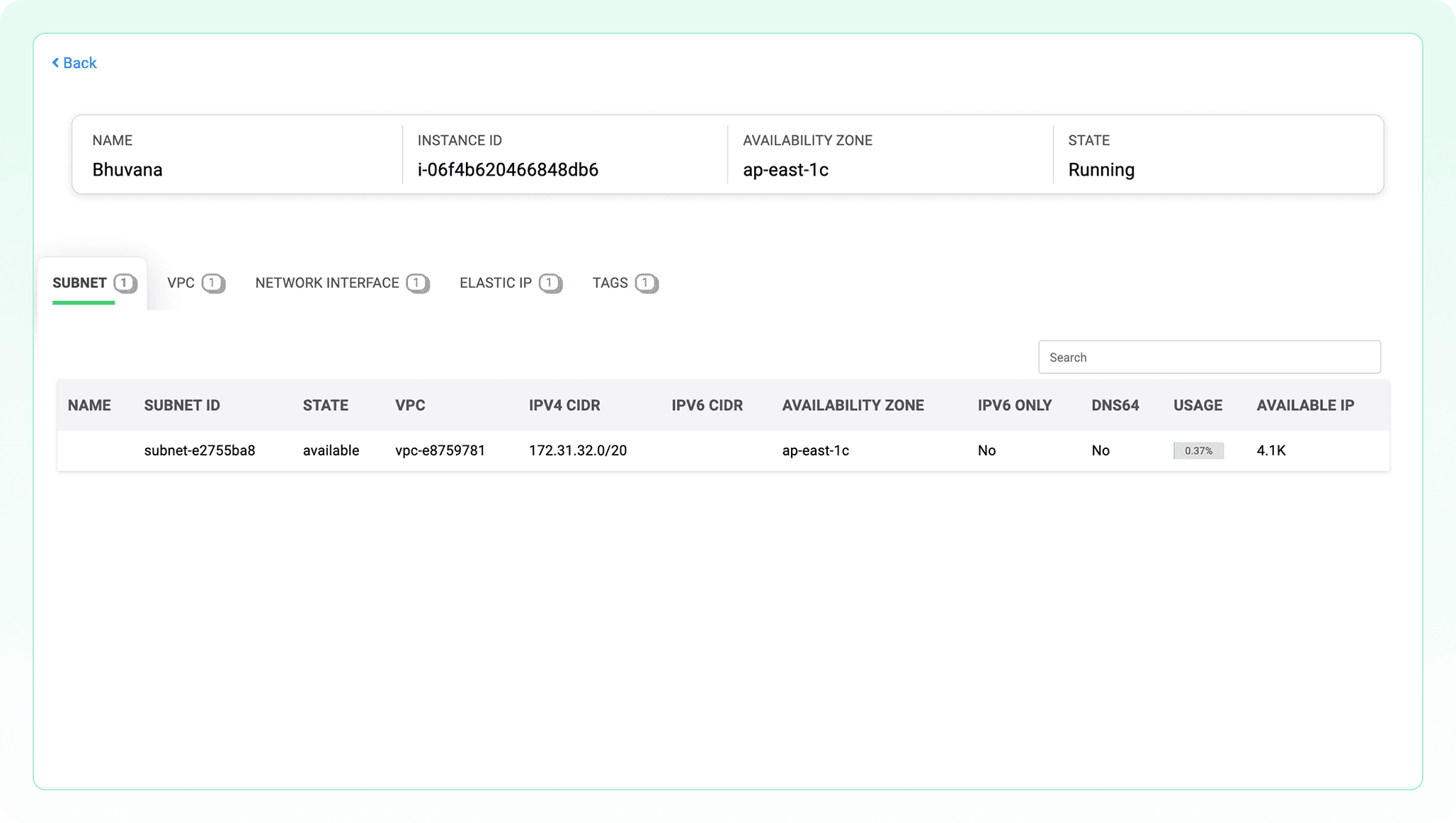
DDI Central also helps connect EC2 instances to the network layers that support them. Teams can trace an instance to its subnet, VPC, ENI, and Elastic IP. They can identify public exposure, inconsistent tagging, and dual-stack readiness. Each server stops being an isolated row in a console and becomes a known, connected part of the infrastructure.
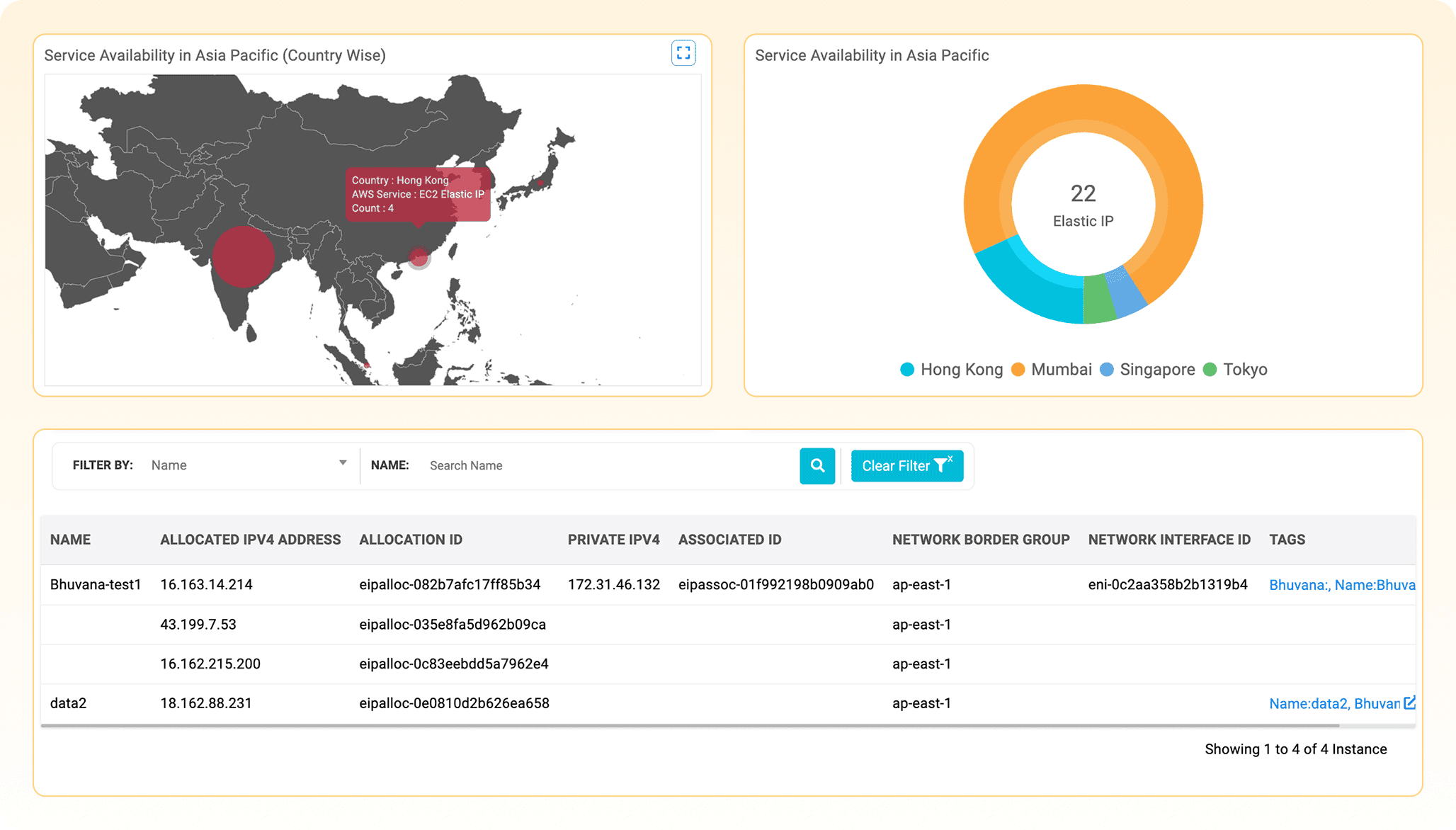
Monitor how many Elastic IPs are allocated vs. used, helping prevent wastage, cost overruns, or public IP exhaustion. Directly correlate each Elastic IP with its associated instance, private IP, network interface, and tags, offering full traceability of address assignments. Quickly spot and deallocate idle or orphaned EIPs that incur cost but aren't attached to any resource.
ECS: Container visibility from cluster to container
Amazon ECS powers containerized applications, but container visibility can become fragmented quickly. Clusters, services, tasks, task definitions, launch types, and container details often require multiple levels of navigation.
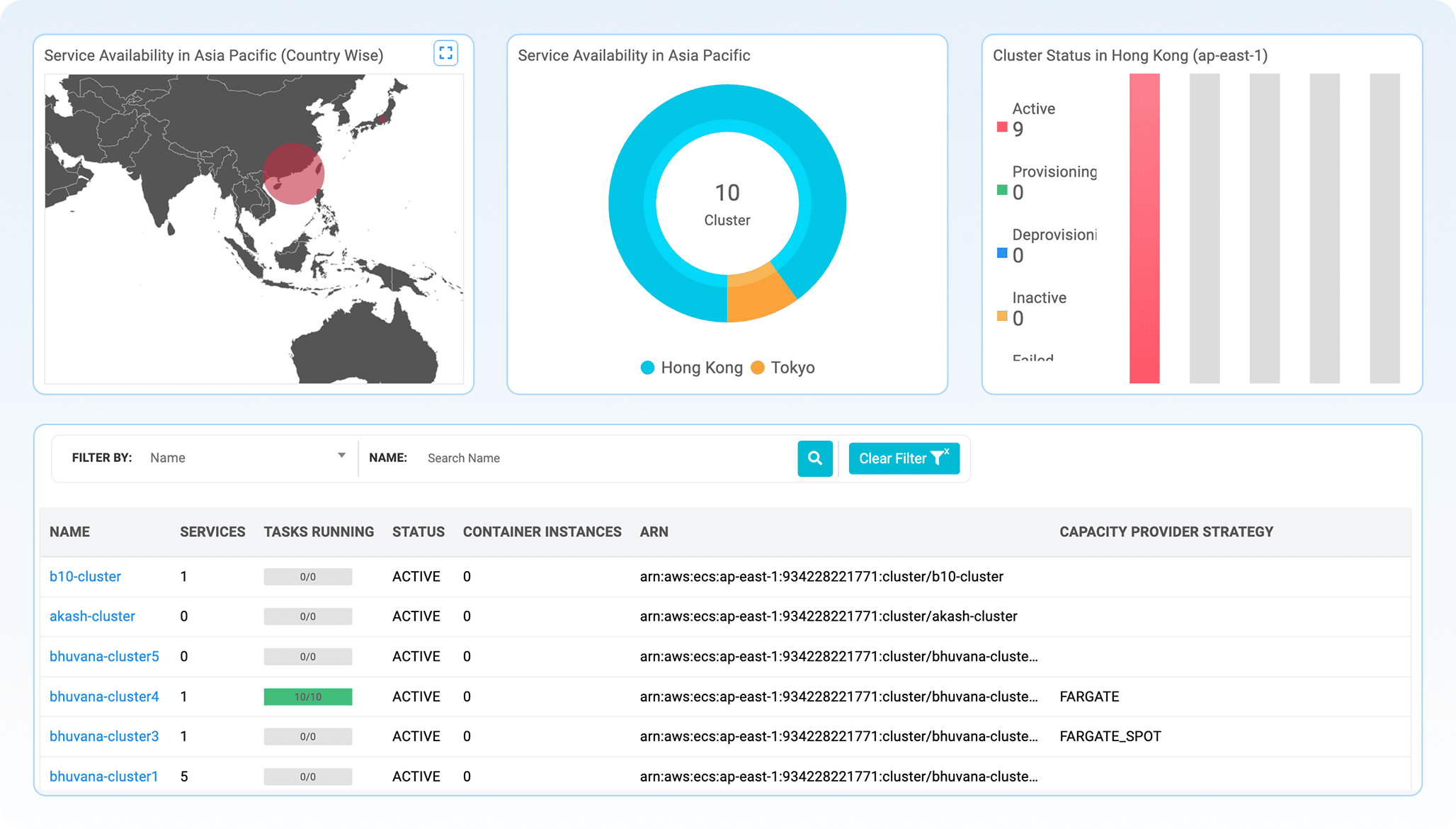
DDI Central brings ECS visibility into a layered view.
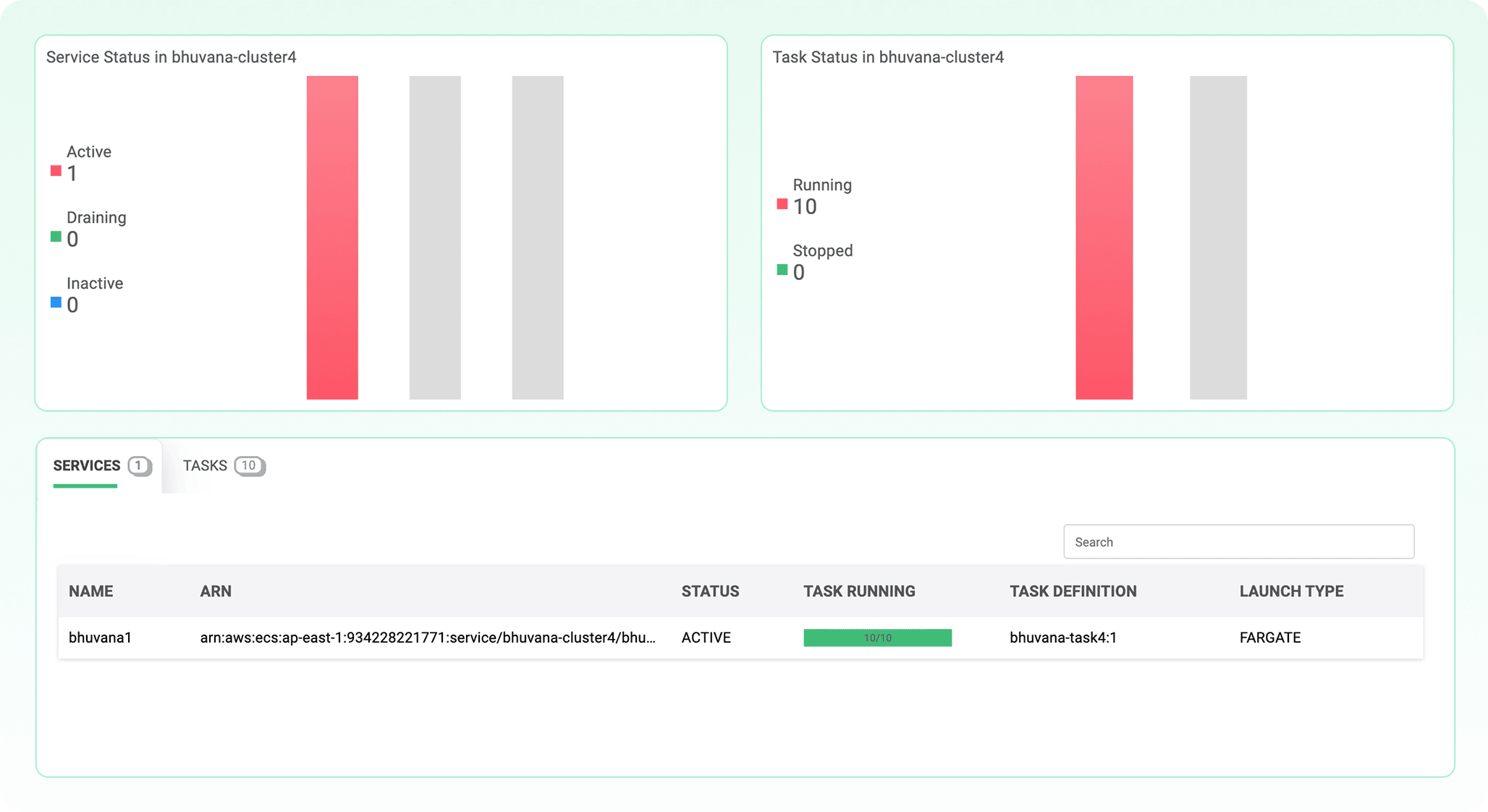
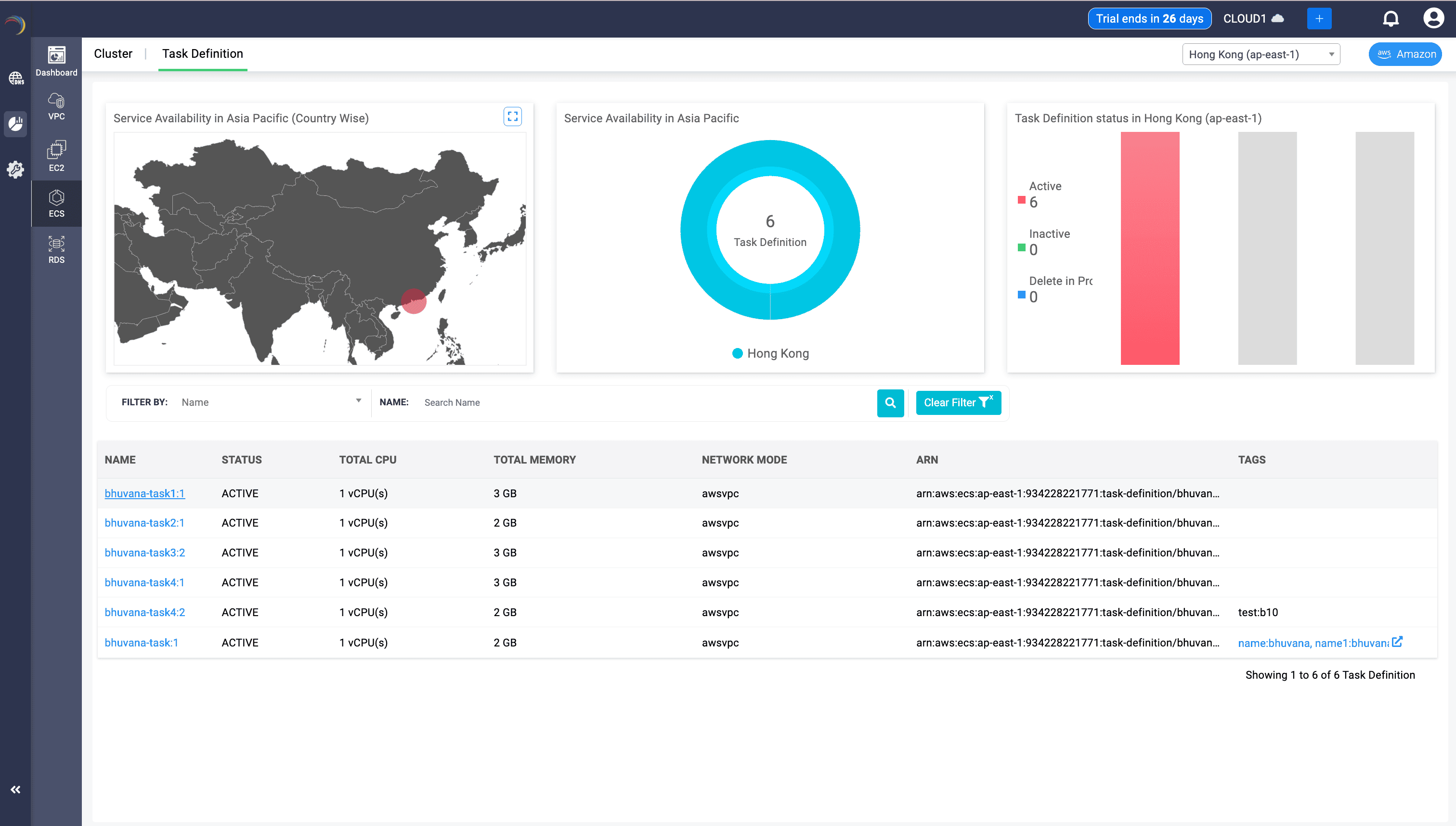
Teams can monitor cluster distribution across regions, understand where container workloads are concentrated, and identify deployment issues early. They can compare desired task counts with running task counts, which is critical because the difference between configuration intent and runtime truth is where many container problems begin.
Launch type visibility also matters. Fargate workloads and EC2-backed workloads have different operational and cost implications. DDI Central makes those distinctions clearer, helping teams plan capacity and troubleshoot more effectively.
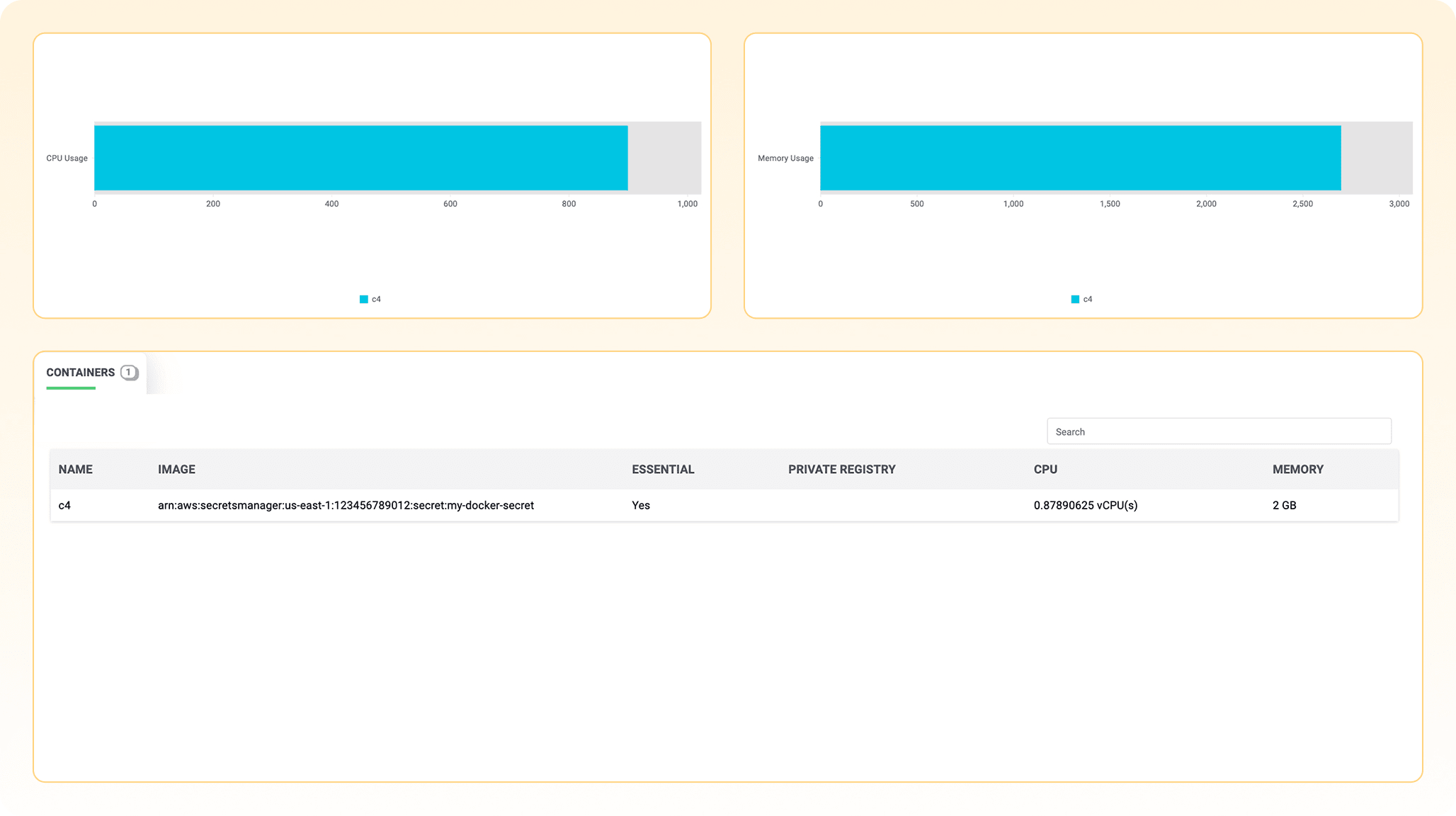
At the container layer, teams can review CPU and memory utilization, image sources, registry details, and containers marked essential for uptime. This helps teams move from a high-level container count to a practical understanding of what is running and what it depends on.
RDS: Databases as network citizens
Most monitoring tools treat databases as services. They track performance, storage, connections, and query behavior. DDI Central adds a network-aware perspective by showing where databases live, which subnets they depend on, and how they connect to the larger AWS environment.
This matters because database availability is not just a database issue. It is also a network issue.
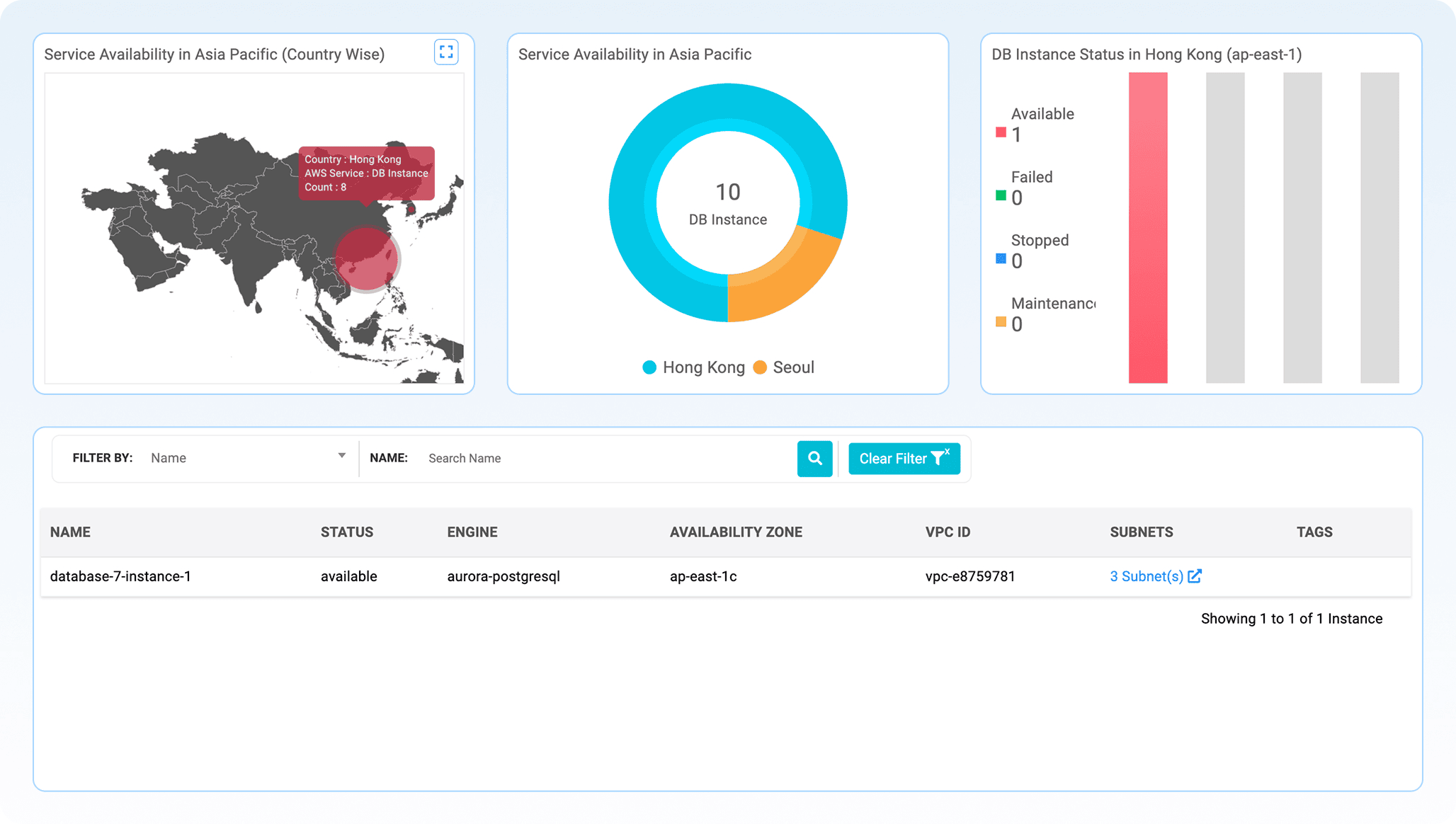
With DDI Central, teams can see RDS distribution by region and country, check health states, review engine types, validate Availability Zone placement, and trace databases to their parent VPCs and attached subnets. This helps teams verify whether databases are truly spread for high availability or quietly concentrated in a way that creates risk.
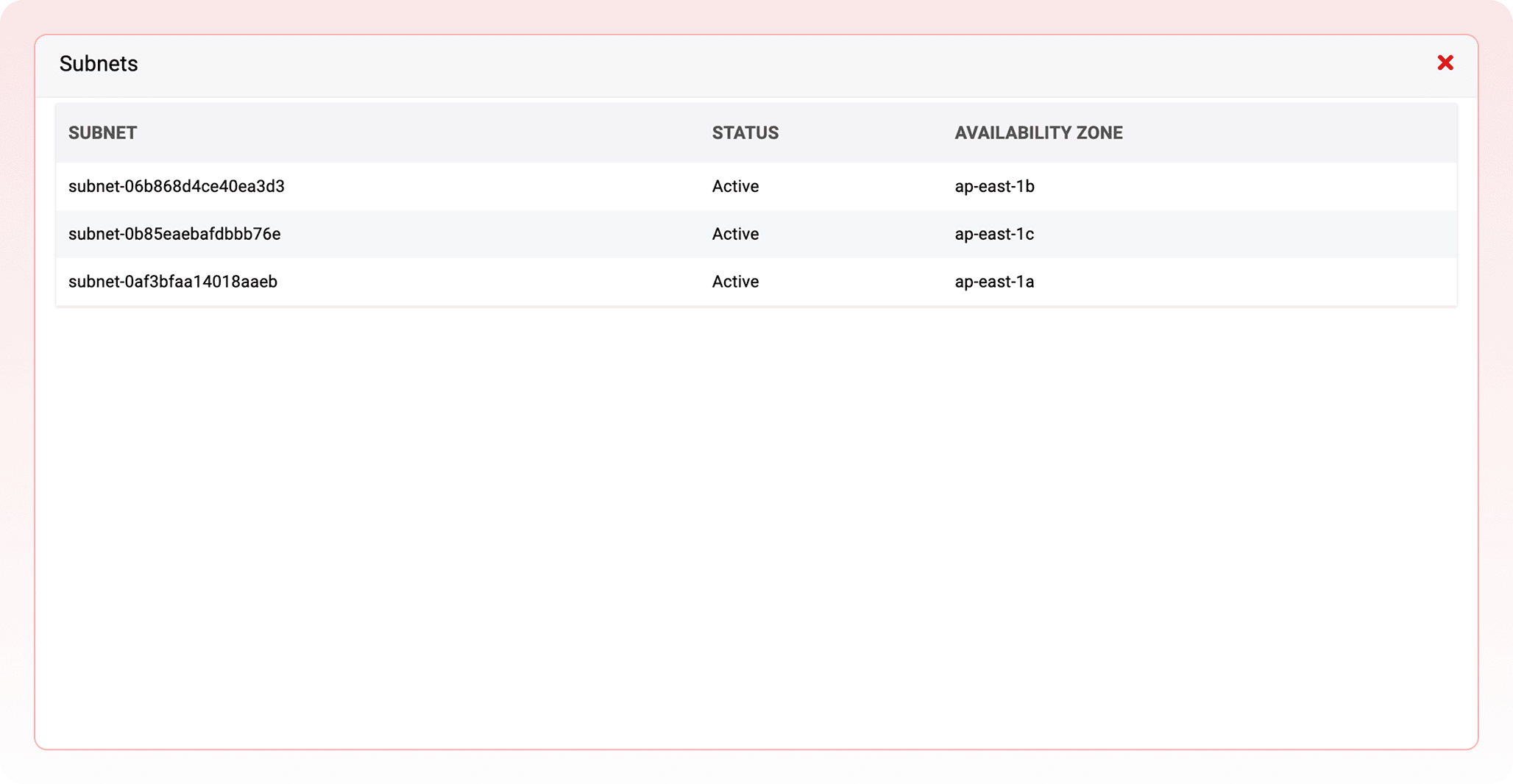
Subnet diversity is especially important. RDS resilience often depends on whether supporting subnets span multiple Availability Zones. DDI Central helps make that spread visible, so failover readiness can be checked instead of assumed.
When a database becomes unreachable, teams can trace the path from database to subnet, VPC, zone, and DNS context faster. That turns database troubleshooting from a cross-team investigation into a clearer operational workflow.
Why hybrid visibility is now a governance requirement
A single, clear view of infrastructure is no longer a luxury. It is a governance requirement.
Auditors and regulators do not care whether a workload runs in an on-premises data center or in an AWS region. They care whether the business can produce an accurate, current inventory of what exists, where it is hosted, and how it is controlled. DDI Central helps provide that visibility across on-premises DDI and AWS network assets in one place.
The same visibility also helps control cloud spend. Unused public IPs, stopped instances, oversized networks, underutilized resources, and databases running in unnecessary regions are common symptoms of cloud sprawl. When finance and engineering teams can see resource distribution and usage through the same lens, cost conversations become more factual and less reactive.
Reliability also depends on connected visibility. Knowing that a resource exists is not the same as knowing how it is connected, whether it is resilient, or whether it is placed correctly. DDI Central shows relationships, not just lists, helping teams validate business continuity claims with evidence.
For regulated industries, the geographic map is especially useful. Banking, healthcare, government, and other compliance-heavy sectors often need to prove where resources live. A visual map turns that proof into a repeatable process rather than a manual project.
The hybrid advantage DDI Central delivers
Cloud-only tools see the cloud. On-premises tools see the data center. DDI Central helps bring both worlds closer together.
That means cloud address ranges and on-premises address spaces can be understood through the same operational mindset. DNS, DHCP, and IPAM teams can view AWS assets alongside the infrastructure they already govern. Compliance reports, capacity reviews, troubleshooting workflows, and resource audits become easier because teams are not forced to switch between disconnected tools and disconnected ways of thinking.
This is what hybrid visibility should mean: not two dashboards open side by side, but one platform that helps teams understand how cloud and on-premises infrastructure coexist.
The bottom line
Hybrid sprawl becomes hybrid governance when teams can see what they run, where it lives, how it connects, and whether it is healthy.
DDI Central’s Cloud Observability module gives infrastructure and network teams a clearer way to monitor AWS network assets such as VPCs, subnets, EC2 instances, ECS workloads, RDS databases, Elastic IPs, and ENIs. It reduces manual lookups, improves troubleshooting, exposes capacity risks earlier, supports compliance, and brings AWS visibility into the same console used for DDI operations.
The data is already there. The real question is whether teams are spending hours assembling it, or minutes acting on it.
See your AWS network the way it was meant to be seen. Try DDI Central’s Cloud Observabilityand bring your hybrid infrastructure under one lens.